
How to Write an Incident Report (With Examples)
Learn incident reporting essentials in this guide. It includes incident report writing purpose, key elements, narrative crafting, examples, and forms for various fields.

Incident reporting plays a critical role in workplace safety, yet many organizations still struggle with consistent reporting practices. Studies on workplace safety culture across industries show that while most employees understand the importance of reporting incidents and near misses, many events still go undocumented due to unclear processes, time constraints, or lack of easy reporting tools. This gap between awareness and actual reporting can create blind spots in safety programs and prevent organizations from identifying risks before they lead to more serious incidents.
When incidents go unreported, companies lose valuable insights that could help prevent future injuries, equipment damage, operational disruptions, or compliance issues. Effective incident reporting ensures that safety teams have the information they need to investigate events, identify root causes, and implement corrective actions that protect workers and strengthen operational safety.
In this guide, you’ll learn how to improve incident reporting practices and create clear, well-structured incident reports that support better decision-making and risk management.
You’ll learn how to:
- Optimize the incident reporting process within your organization
- Craft a clear and detailed incident report
- Understand the core elements of effective incident documentation
- Write a structured and objective narrative of workplace incidents
- Use incident report examples to improve clarity and consistency
- Find incident report forms and templates suited to your industry
- Use modern incident reporting software to streamline documentation and investigations
Equip yourself with the knowledge and the tools to transform your incident reporting from tedious form completion to a smart working environment. From basic principles to safety incident management software, your incident reporting toolkit is right here.
Incident Report and Its Purpose
An incident report is a formal written document that serves as a reference when an unexpected event or accident occurs. This event could result in injury, damage to property, or work interruptions.
The main purposes of an incident report are to:
- Capture key details of what happened while events are still fresh in witnesses’ minds. It is the document of who, what, when, where, injuries/damage sustained, equipment/property affected, actions taken, and more.
- Allow a thorough investigation of the root causes and contributing factors that culminated in the incident. The more thorough your report, the more insight it provides on how and why the incident transpired.
- Identify any safety or operational policies violated that were part of the incident. It reveals if any protocols were not followed or were overlooked altogether.
- Inform subsequent action to prevent any similar incidents from occurring in the future. It will help management to see where they need to make improvements in processes, training equipment, policies, facilities, etc.
[YOU CAN ALSO DOWNLOAD THIS FREE GUIDE TO EFFECTIVE WORKPLACE INCIDENT REPORTING]
The Comprehensive Incident Reporting Guide
Core Components of an Effective Incident Report
Fundamental Information
The fundamental information outlined in an incident report includes:
- Incident type: Categorizing the incident provides a point of reference. Common types include injuries, property damage, security incidents, workplace violence, environmental problems, privacy breaches, and more.
- Location, date and time: The “where and when” of any incident is a must. Be as specific as you can with location, and with date and time.
- Names of individuals involved: List all people involved in the incident. Give the full name and any title or role, i.e., Robert Patterson, Security Guard. If there were injuries, list the person who was injured and list witnesses with their titles or roles, i.e. Alice Lansing, Accountant.
- Injuries or illnesses sustained: Include a list of injuries, first aid that might have been administered, and any medical treatment. No injuries? State, "No injuries were sustained."
Specific Details
The specifics of an incident report provide important context:
- Equipment involved: Make a note of any tools, machinery, materials, chemicals or other equipment involved in the incident. Include the manufacturer, model number if it applies, and precise details of how the equipment was being used.
- Events leading up to the incident: The reconstruction of events can offer a number of insights into causes. Provide a concise chronological sequence of events leading up to the incident.
- Account of the incident: A detailed, chronological narrative of the incident itself will bring the incident to life. Use precise, objective language, quoting any witness statements where relevant.
- Subsequent events: Make a note of any actions that were taken after the incident, such as first aid, medical treatment, notification of the appropriate authorities, or checks for any damage or maintenance required on the equipment involved.
This leads to a basic account combined with vivid detail, making a full and useful incident report. The combination allows for the causes to be properly investigated and for the incident to be the basis for preventing similar eventualities.
Crafting an Effective Incident Report
A narrative structure is essential while writing an incident report. Organize the report into three basic sections:
Introduction
Who, what, where, and when should be answered in the introduction. As an example:
“Jane Doe, an ABC Company cashier, was involved in an incident around 10:15 am on Tuesday, January 1, 2026. The incident occurred in the company's headquarters breakroom at 123 Main St, Anytown, USA."
From here, we know that Jane Doe was involved, an event occurred, on Tuesday, January 1st, 2026, at 10:15 am, and in the breakroom at 123 Main St. It shows how this introduction sets the background for the report.
Body
The body details the incident from beginning to end. It includes all relevant occurrences before, during, and after the incident.
As an example:
“Jane Doe walked into the breakroom and made her coffee at the coffee maker. As she reached for the coffee pot, she slipped on a puddle liquid and fell to the ground. The coffee pot struck her right calf and shattered. Jane Doe screamed out in pain with the fall.”
The body reaffirms who, what, where, and when, as well as the chronology.
Conclusion
The conclusion describes the resolution of the incident as well as key findings. As an example:
“Emergency services were called at 10:18 am. Jane Doe was removed by ambulance to Riverdale Hospital for a laceration of her right leg. She received 12 stitches. The broken coffee pot was cleaned and thrown away. Facilities were made aware and requested to keep a supply of Wet Floor signs positioned near breakroom spills.”
In the conclusion, the resolution and incident investigation recommendations are briefly stated to bring the matter to a close.
This introduction-body-conclusion structure makes incident reports logical and complete and makes them easy to understand. A story that winds its way to a conclusion makes a whole lot more sense.
Incident Report Examples: How to Write Effecitve Incident Reports
Here’s how an incident report will be written for “Main Office Security Incident - Unauthorized Entry Attempt”:
Type: Security Incident
Location, Date, Time: Main Office, January 28, 2026, 10:30 AM
Names of Individuals Involved:
Robert Patterson (Security Guard) and Alice Lansing (Accountant)
Injuries Sustained:
Robert Patterson: NoneAlice Lansing: Bruised thigh
At 10:30 AM, January 28, 2026, a security incident occurred in the main office. Robert Patterson, the diligent security guard, and Alice Lansing, an accountant were involved. The incident that occurred was an unauthorized entry attempt.Someone tried to break into the main office. Security guard, Robert Patterson, spotted the intruder. Patterson quickly approached the would-be intruder and verbally discouraged him. Accountant, Alice Lansing, who was in the vicinity, as she tried to make a run for it, she injured her thigh. She’s going to be fine, after immediate emergency help. The invader did not physically assault security guard, Robert Patterson, who was not hurt.The manager’s office was alerted to the attempted unauthorized entry and the security guard’s intervention, immediately.
(This Incident report is vital, because it captures the security event and can be reviewed to make future security improvements.)
Other Examples of Incident Reports [Manufacturing And Mining Industry]
Manufacturing Industry Incident Report Example:
Type: Equipment Malfunction
Location, Date, Time: Factory Floor, XYZ Manufacturing, January 7, 2026, 3:45 PM
Names of Individuals Involved:
John Miller (Machine Operator) Sarah Thompson (Supervisor)
Injuries Sustained:
John Miller: Minor cuts on hands due to malfunctioning machinery.
At approximately 3:45 pm on January 7, 2026, an incident occurred on the factory floor of XYZ Manufacturing. Machine Operator, John Miller, who was working on the CNC machine (Model: AlphaTech-500) producing brake parts, received minor cuts to his hands when the unit unexpectedly malfunctioned. Upon notification Supervisor, Sarah Thompson arrived on the scene, applying first aid to Miller, as she simultaneously informed the second shift manager of the incident. The affected equipment was shut down, received a maintenance tag, and was put out of service pending inspection. There were no further injuries reported in connection with the incident.Subsequent investigation revealed the cause of the incident was a software glitch, and included corrective action for same: software updates, etc. Additional corrective action, also initiated, includes additional training for machine operators.
Mining Industry Incident Report Example:
Type: Rockfall
Location, Date, Time: Quarry Site A, ABC Mining, January 15, 2026, 10:00 AM
Names of Individuals Involved:
Michael Turner (Driller) Emma Rodriguez (Safety Officer)
Injuries Sustained:
Michael Turner: Bruised shoulder and minor abrasions.
At 10:00 AM on January 15, 2026, Driller Michael Turner was injured during the excavation of a rockfall at Quarry Site A of ABC Mining.
Safety Officer Emma Rodriguez immediately activated the emergency response procedures, securing the area and requesting medical assistance. Michael was promptly treated by the duty nurse, and then transferred to the on-site medical facility for further assessment. Subsequent investigation revealed that a section of the rock face collapsed unexpectedly due to geological instability.
Corrective measures taken included reinforcing safe work procedures for excavation activities and conducting a comprehensive geological survey in vulnerable locations before drilling activities.
Incident Report Forms (For Different Organizations)
Reporting incident forms are the usual medium used to document incidents. They are tailored to the sector and the organization, so incident report forms differ. Here are a few examples:
General Safety Incident Report
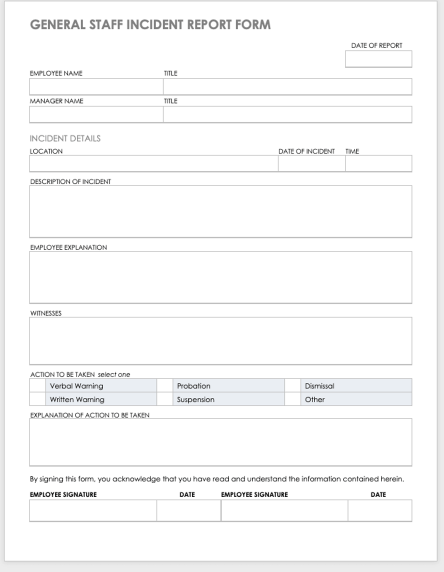
These generic staff or personnel incident reports are employed by many businesses to log employee, customer, and visitor incidents. A general staff incident report generally includes:
- Person’s name and contact details
- Incident time, date, and site
- Pertinent details about what happened
- Kind of injury or damage
- Name of witnesses
- Safety measures taken
- Suggestions for prevention
Here’s what a normal general staff incident report looks like:
Incident Report for Construction Sites
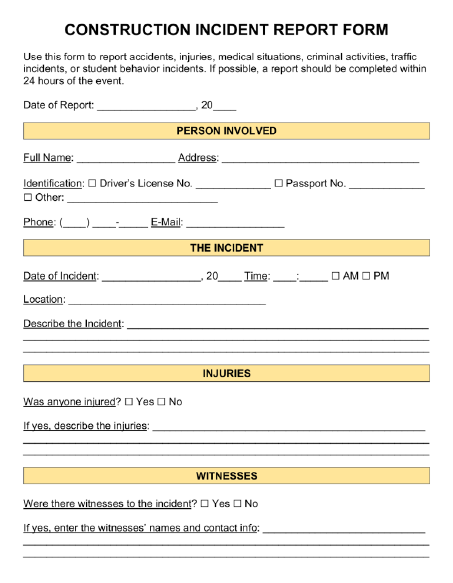
Construction job site safety guarantees in-depth incident reporting. Construction incident reports include particulars, for example:
- Name and role of person injured or involved
- Date, time, exact location, and description of incident
- Type of injury or illness sustained
- Equipment, materials, or chemicals involved
- Actions taken following the incident
- Suggestions to improve safety and prevent recurrences
A normally used construction site incident form looks like this:
Hospital/Clinic Patient Incident Report
Healthcare utilizes unique incident report forms to describe patient care, medical therapy, pharmaceutical errors, laboratory mishaps, confidentiality breaches, and a whole lot more. A healthcare facility or hospital might have an incident report that includes:
- Patient safety incidents, falls, infections, or privacy breaches
- Medication errors or equipment malfunctions
- Workplace injuries to staff
- Security issues, theft, property damage, or vandalism
Here’s a sample of patient incident report form usually used in clinical settings:

Incident Reporting Software For Smarter Workplace Management - SafetyIQ
SafetyIQ is an advanced incident reporting software that transforms incident reporting by providing a sleek, user-friendly platform that sets new industry standards for workplace safety.
Emerging as the leading incident reporting solution, SafetyIQ is redefining workplace safety with a variety of next-generation features and comprehensive free guides.
Take a closer look at the key features of this tool:
- Effortless Incident Reporting: The platform simplifies and centralizes the incident reporting process, allowing users to submit full-featured incident reports – complete with multimedia documentation – with minimal effort.
- Customization for Unique Needs: SafetyIQ tailors incident report forms to meet the unique requirements of each organization, expediting incident data capture and analysis in the process.
- Proactive Safety Measures: This platform is a host of specialized solutions for managing high-risk scenarios – Journey Management, Lone Worker Management, Fatigue Management, and beyond. It helps steer organizations beyond compliance and toward a proactive culture of safety.
- Real-time Insights and Analysis: Organizations enjoy a comprehensive suite of reporting dashboards that reveal the hidden safety performance insights within their data in real-time, featuring color-coded charts and infographics that allow for rapid identification of movements.
- User-Centric Design: The entire solution is designed with an emphasis on the end user, prioritizing a clean, user-friendly interface for both field workers submitting incidents and the managers analyzing the safety trends within their organization.
This software turns incident reporting into the beginning of a proactive safety culture by equipping organizations with the resources they need to put in place world-class safety practices continually. With its ability to assign corrective actions based on a data-driven approach, SafetyIQ is the best solution for workplace management and safety.
Incident Report Frequently Asked Questions
How simple is it to create an incident report?
Creating a live incident report in SafetyIQ is designed to be fast and straightforward. Employees can initiate a report directly from a mobile device or desktop platform and follow a guided process that walks them through the required information step by step.
Users can quickly upload photos, videos, or documents that help illustrate what happened. They can also record witness statements or provide additional details about contributing factors that may have led to the incident.
Because the reporting process is streamlined, incidents can be documented immediately while details are still fresh. This real-time documentation improves the accuracy of reports and enables organizations to respond quickly with appropriate safety measures.
How do you write an effective incident report?
Writing an effective incident report requires documenting the event clearly, accurately, and without speculation. The report should focus on factual information such as the date and time of the incident, the location, the individuals involved, and a detailed description of what occurred. It is important to describe the sequence of events leading up to the incident and what happened afterward, including any injuries, damage, or hazards that were identified.
Good incident reports also include supporting details such as witness statements, photographs, or other evidence that may help investigators understand what occurred. The goal is to create a clear and objective record that can be used for investigation, compliance documentation, and future safety improvements. Many organizations use incident reporting software or structured templates to guide employees through this process and ensure reports capture all the necessary information.
When should an incident report be completed?
An incident report should be completed as soon as possible after a workplace incident occurs. Prompt reporting helps ensure that important details are recorded while they are still fresh in the minds of employees and witnesses. Immediate documentation also allows safety teams to respond quickly, investigate the situation, and implement corrective actions if necessary.
Incident reports are typically required for events such as workplace injuries, illnesses, near misses, equipment damage, environmental incidents, or any unsafe conditions that could pose a risk to employees. Even incidents that do not result in injury should be documented, as near misses often provide valuable insights into hazards that could lead to more serious accidents in the future.
Timely and consistent incident reporting helps organizations maintain regulatory compliance, improve workplace safety practices, and prevent similar incidents from happening again.
What is incident reporting software and why is it critical for businesses?
Incident reporting software is a digital system designed to help organizations document, manage, and investigate workplace incidents in a structured and consistent way. These incidents may include workplace injuries, near misses, property damage, environmental events, or safety violations. Instead of relying on paper forms, spreadsheets, or email chains, incident reporting software centralizes all safety event data into a single platform where reports can be submitted, reviewed, and analyzed.
This type of system is critical for businesses because it helps organizations respond to incidents faster while also identifying patterns that may indicate underlying safety risks. When incident data is properly documented and tracked, safety teams can conduct more effective investigations, implement corrective actions, and prevent similar incidents from happening again. In addition, incident reporting systems help organizations maintain regulatory compliance with agencies such as OSHA by ensuring that incident records are accurate, accessible, and properly documented.
Ultimately, incident reporting software plays a key role in building a proactive safety culture where employees can easily report issues and management can continuously improve workplace safety.
How does SafetyIQ provide incident reports?
SafetyIQ enables incident reporting through a mobile-friendly platform that allows employees to submit incident reports in real time directly from the field. Workers can quickly capture critical details about an incident as it occurs, including descriptions, photos, videos, witness information, and location data.
Because reports are submitted instantly, safety teams and supervisors receive immediate visibility into what happened and can begin the investigation process without delays. This real-time reporting capability helps organizations respond quickly to hazards, initiate corrective actions, and communicate important safety information across teams.
The platform also organizes incident data automatically, allowing managers to track incidents, monitor trends, and generate reports that support ongoing safety improvement initiatives.
Can I find incident report templates in SafetyIQ?
Yes, SafetyIQ includes free incident report templates that help ensure every incident is documented in a consistent and comprehensive format. These templates guide employees through the reporting process by prompting them to capture essential information such as the date and time of the incident, location, individuals involved, a description of the event, and any contributing factors.
Using standardized templates helps eliminate missing or incomplete information that often occurs with manual reporting methods. It also allows organizations to maintain consistent documentation across departments, locations, and job sites.
SafetyIQ’s templates can also be customized to match the specific needs of different industries or organizations. Companies can add fields, adjust workflows, or modify reporting requirements to align with their internal safety programs and regulatory obligations.
How user-friendly is the system for incident reporting and management?
SafetyIQ was designed with ease of use in mind so that employees at every level of an organization can participate in safety reporting without needing extensive training. The platform features a clean and intuitive interface that makes it simple for workers to submit incident reports quickly, even in fast-paced environments.
Field workers can access the system through mobile devices, allowing them to document incidents directly from the job site. Managers and safety professionals can then review reports, assign investigations, track corrective actions, and analyze trends from a centralized dashboard.
This user-centric design encourages more employees to report incidents and near misses, which ultimately helps organizations gather more accurate safety data and improve their overall risk management strategy.
SafetyIQ brings incidents, inspections, training, journey management, lone worker safety and fatigue into one mobile app. Tell us about your crews and sites for tailored pricing.
Safety insights, straight to your inbox
New guides, monthly safety topics and SafetyIQ updates for EHS and operations leaders. Unsubscribe anytime.

.png)

Get a demo built around your sites, your teams, and the way your people work.
EHS, journey, and fatigue management software for field-heavy teams.

.png)

.png)